Charging a No-Show Fee When Reservations are Cancelled
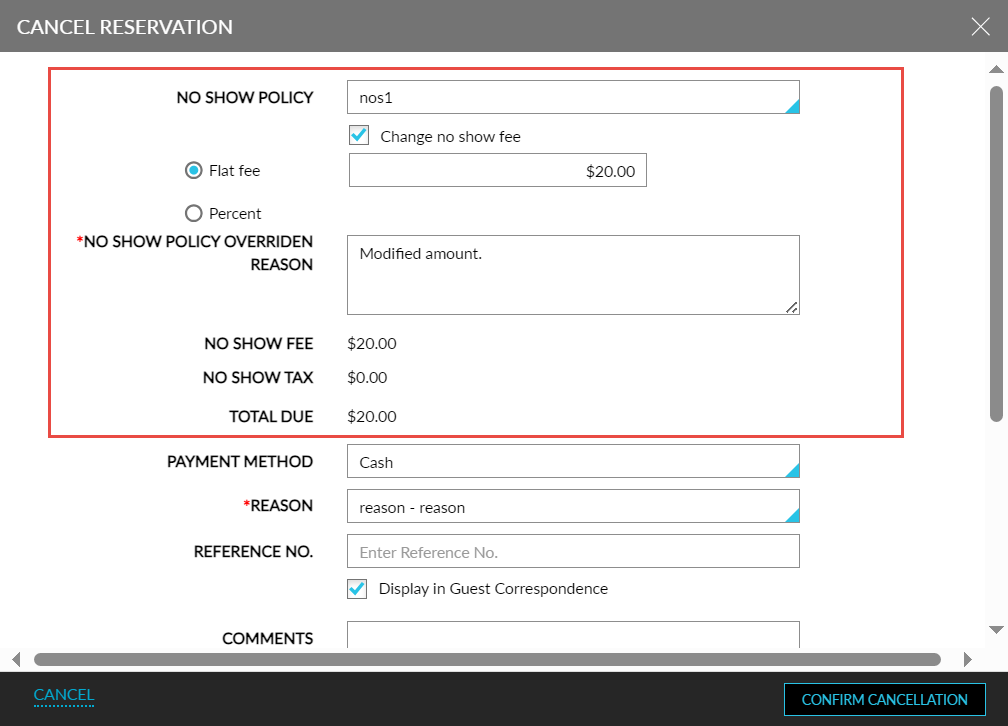
When users cancel a reservation from the Reservation screen using the Cancel Reservation option or using the Mark as no-show/cancel option on the Night Audit screen, the Mark as No Show checkbox is hidden in the Cancel Reservation screen. The details of the no-show policy associated with the rate plan/package/group are displayed.
Users can modify the no-show fee for the policy by enabling the Change no show fee checkbox. When enabled, users can either modify the flat fee amount or the percentage. When users modify the no-show amount, the reason for the override must be entered in the No Show Policy Override Reason field.
When users click the Confirm Cancellation option, the no-show fee is posted to the reservation and the status of the reservation is changed to NOS.
-
When the reservation has an additional non-refundable payment/deposit that is greater than the amount due, the no-show fee is adjusted to match the non-refundable payment/deposit amount. Only users with the Stay_OverrideNonRefundable permission will be able to override and apply the normal no-show fee even if the non-refundable payment is greater than the total amount due.
-
When the reservation has an additional non-refundable payment/deposit that is lesser than the amount due, the configured no-show fee will apply.
The refundable payment/deposit amount can be refunded to the guests using the Initiate Refund option on the Cancel Reservation screen.
A record is created in the Audit Log screen for the entity type, No Show Policy, for the following:
-
When a new no show policy is configured for the property.
-
When a no show policy is modified, the created record displays the number of modifications made, the timestamp, and the username of the user who performed the modifications.
-
When a no show policy is deactivated for the property, the created record displays the details of the deactivated policy along with the timestamp and the username of the user who deactivated the policy.
-
When a reservation is marked as No Show/Cancelled during manual or auto date roll.
When users try to deactivate a no show policy that is mapped to an existing rate plan/package/group/calendar, the following message is displayed: The Selected No Show Policy Cannot be Made Inactive as It is Associated With a Rate Plan/ Package/ Group/ Calendar.
When users to deactivate or modify the transaction item that is associated with one or more no-show policies configured at the property, the following message is displayed: Transaction Item Is Associated with One Or More No Show Policies And Cannot Be Disabled.
Records are also created in the Reservation History section of the reservation when reservations are marked as Cancelled or No-Show during manual and auto-date roll.